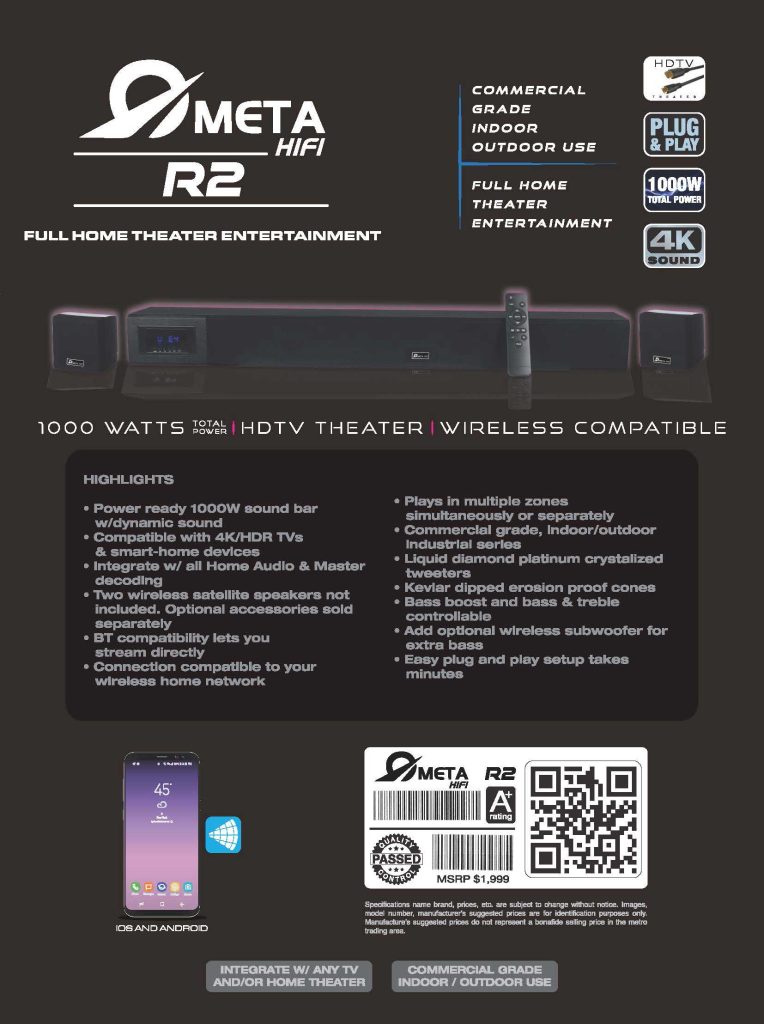
Meta HiFi R2 Home Theater Soundbar

Most people buy a soundbar the way they buy a small appliance: quick search, quick checkout, plug it in, and hope it “just works.” Sometimes it does. Often, it works—but not well, not consistently, and not in the way your room (and your habits) actually need.
I prefer a different approach: treat audio like a small project with clear requirements. Not a complicated project. Just a structured one. When you do that, you stop chasing settings and start getting repeatable results—whether you’re watching films, streaming music, or setting up sound for a weekend gathering.
The Meta HiFi R2 positions itself as a “full home theater entertainment” soundbar with 1000 watts total power, wireless compatibility, and a plug & play promise, with use cases that go beyond a single living-room setup. Meta HiFi R2 Home Theater Sound…
So instead of reviewing it like a glossy brochure, I want to walk through how I would evaluate—and set up—something like the R2 in a practical, project-manager way.
Development
1) Start with scope: what problem are you actually solving?
Before specs, start with the outcome. I usually define it in one sentence:
- “I want clear dialogue at low volume and a wider soundstage for films.”
- “I want stable, room-filling sound for music, without fiddling every time.”
- “I want one system that can handle indoor listening and occasional outdoor use.”
The R2 explicitly leans into versatility: it’s presented as commercial grade and suitable for indoor/outdoor use, while still being positioned for home theater. Meta HiFi R2 Home Theater Sound…
That matters, because “versatile” systems can be either a blessing or a compromise. The way you avoid compromise is by clarifying scope early: primary room, typical listening hours, and the one thing that bothers you most about your current setup.
If you do that, features stop being marketing bullets and start becoming solutions.
2) Translate specs into constraints you can manage
“1000 watts” sounds impressive. In practice, power only helps if the system stays clean at the volume you actually use. The brochure also highlights dynamic sound and component choices like crystallized tweeters and Kevlar-dipped cones, which signals an intent toward clarity and durability—not just loudness. Meta HiFi R2 Home Theater Sound…
Here’s how I turn that into actionable constraints:
- Room size & placement: a longer soundbar in a reflective room will exaggerate highs if you place it too close to hard surfaces.
- Volume range: if you mostly listen at 10–25% volume, dialogue performance matters more than peak output.
- Control needs: if you’ll adjust sound often, you want simple access to bass/treble controls (the R2 mentions bass/treble adjustment and bass boost). Meta HiFi R2 Home Theater Sound…
This is the “project plan” moment: you’re defining what you will test after setup.
3) Integration is the hidden cost (and where good setups win)
Most frustration with home audio comes from integration, not from sound quality. Inputs, TV compatibility, device switching, and network behavior create 80% of the daily friction.
The R2 is described as compatible with 4K/HDR TVs and even smart-home devices, and it also supports Bluetooth streaming plus connection to your wireless home network. Meta HiFi R2 Home Theater Sound…
On paper, that covers the typical requirements. In real life, I still plan integration deliberately:
A simple integration checklist I’d use:
- Primary use path: TV → soundbar (this must be stable).
- Secondary path: phone → soundbar (Bluetooth or network streaming).
- Edge cases: guests, switching sources quickly, power-on behavior.
If you skip this, you get the classic “it works, but…” experience: it works, but only after two remote controls and three tries.
4) Treat setup like a short sprint, not a one-shot event
The brochure says the R2’s plug and play setup takes minutes. Meta HiFi R2 Home Theater Sound…
I believe that for getting audio output quickly. But getting good sound usually takes two passes: placement first, tuning second.
This is how I’d run it as a small sprint:
Sprint 1 (30–45 minutes): placement and baseline
- Center the soundbar to the TV, keep the front edge close to flush (so reflections don’t smear dialogue).
- Set bass/treble neutral.
- Watch a dialogue-heavy scene at low volume. Don’t chase “cinema.” Chase clarity.
Sprint 2 (15–25 minutes): tuning for your room
- Adjust treble only if dialogue sounds veiled or harsh.
- Adjust bass only after treble feels right.
- Save one “movie” profile (more bass, slightly lifted highs if needed) and one “everyday” profile (clean mids, controlled bass).
I sometimes literally schedule this with time blocking. Not because it’s complicated, but because I don’t want it to drag across two weeks of half-finished tweaking.
5) Multi-zone and expandability: useful only if you plan for it
One interesting point in the brochure is multi-zone behavior: the R2 can play in multiple zones simultaneously or separately. Meta HiFi R2 Home Theater Sound…
That can be genuinely useful—especially in open-plan homes or when you want consistent background music while moving between areas.
But multi-zone setups fail when the network is unstable or when you don’t define “zones” clearly. If you intend to use that feature, treat it like a mini-workflow:
- Define zones by use, not by rooms. Example: “work zone” (desk area) vs “social zone” (living area).
- Decide what content belongs where. Films don’t need multi-zone. Music might.
- Keep controls simple so you’ll actually use it.
The brochure also mentions optional expansion: wireless satellite speakers and an optional wireless subwoofer for extra bass. Meta HiFi R2 Home Theater Sound…
My practical rule: expand only after the baseline setup feels stable for two weeks. Otherwise you’ll stack variables and won’t know what improved (or broke) the system.
6) Build a maintenance habit that is almost invisible
Great setups stay great because you don’t fight them. I like lightweight routines—the same way I’d run a weekly review for a personal workflow.
For audio, the “review” is tiny:
- once a week, check that your TV output settings haven’t changed after updates;
- keep one reference scene and one reference song for quick sanity checks;
- if you host often, set a “guest mode” volume cap so nobody pushes it into distortion.
Small habits. Predictable results.
Conclusion
The Meta HiFi R2 is marketed as a broad-use, high-power soundbar system: 1000W, wireless-compatible, multi-zone capable, positioned for HDTV theater and even indoor/outdoor scenarios, with accessible bass/treble controls and add-on options for satellites or a subwoofer. Meta HiFi R2 Home Theater Sound…
Those claims are only half the story, though.
The other half is how you implement it. If you treat it like a small project—define scope, plan integration, run a quick setup sprint, then stabilize before expanding—you’ll get a system that behaves the way you expect, day after day.
That’s the real benchmark. Not the wattage on the box, but the friction you don’t feel once it’s installed.