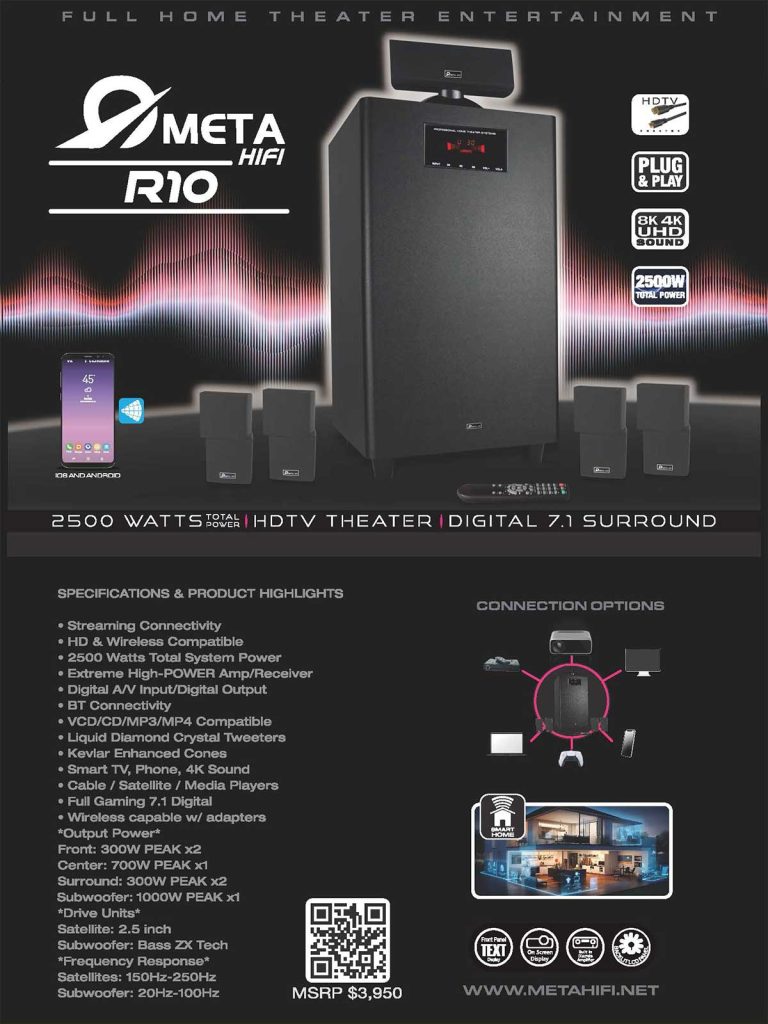
Meta HiFi R10 Home Theater System

A full surround system can be a real upgrade—but only if it’s implemented with a bit of discipline. Most disappointment I see isn’t about “bad sound.” It’s about a setup that was rushed: speakers placed wherever there was space, cables improvised, inputs unclear, and volume pushed to compensate.
The Meta HiFi R10 is positioned as a plug & play HDTV theater system with digital 7.1 surround and 2500W total power, aimed at home entertainment that can also handle high-demand use cases like gaming and multi-source setups. Meta HiFi R10 Home Theater Syst…
If you treat it like a small project—scope, layout, integration, then tuning—you can get a system that’s not just impressive on day one, but consistent every day.
Development
1) Define the result before you touch a cable
Start with one clear target. Pick the main job this system must do well:
- Films: clear dialogue and believable surround effects at normal listening levels
- Gaming: positional cues that feel “locked in” and predictable
- Music: balanced sound without the “boomy sub / sharp highs” problem
The R10’s promise is broad—“full home theater entertainment”—and that’s fine, as long as you decide what “good” means in your room. Meta HiFi R10 Home Theater Syst…
This one decision prevents the classic trap: chasing settings endlessly because you never defined success.
2) Use the system’s structure to plan the room
A digital 7.1 setup forces you to be intentional, because placement affects everything. The brochure highlights Front, Center, Surround speakers plus a subwoofer, with a power breakdown that’s useful for planning:
- Front: 300W peak ×2
- Center: 700W peak ×1
- Surround: 300W peak ×2
- Subwoofer: 1000W peak ×1 Meta HiFi R10 Home Theater Syst…
In practical terms:
- The center channel carries dialogue weight. Treat it as the anchor—stable position, aligned with the screen.
- The subwoofer (1000W peak) can dominate a room if you place it in a corner and crank it. Start conservative, then increase gradually.
- The surrounds should support, not distract. If you notice them constantly, something is off—often placement or level.
I approach this like a layout problem, not an audio problem. Get the geometry right first. Tuning comes later.
3) Integration is the make-or-break step
The R10 lists a wide range of compatibility and inputs—digital A/V input / digital output, Bluetooth connectivity, and support for typical sources like Smart TV, phone, cable/satellite, media players, plus a “full gaming 7.1 digital” positioning. Meta HiFi R10 Home Theater Syst…
This is where I set a simple “workflow” so the system behaves predictably:
- Primary workflow: TV → R10 (this should be frictionless)
- Secondary workflow: phone → R10 (Bluetooth for quick music)
- Occasional workflow: console / media player → R10 (stable switching)
If switching sources feels messy, don’t fix it with volume changes. Fix it by clarifying the input map and keeping the daily path simple.
4) Run the setup in two passes (it’s faster overall)
Yes, it’s marketed as plug & play. Meta HiFi R10 Home Theater Syst…
You can get sound quickly. But to get good sound, I recommend two short passes instead of one long night of trial-and-error.
Pass 1: Baseline (30–45 minutes)
- Place speakers in roughly correct positions.
- Keep bass conservative.
- Test with one dialogue-heavy scene and one action scene at moderate volume.
Pass 2: Tuning (15–25 minutes, next day)
- Adjust dialogue clarity first (center balance / overall EQ decisions).
- Then adjust subwoofer level.
- Only after that, fine-tune surround levels.
This spacing works because your ears reset. You stop overcorrecting.
If you like structure, schedule this with a small time block. Not because it’s complex, but because you want it finished cleanly.
5) Power is useful only when it stays controlled
A system rated at 2500W total power can fill space easily. Meta HiFi R10 Home Theater Syst…
That’s an advantage—but it also means you can overwhelm a room fast, especially in apartments or reflective spaces.
The practical approach is simple:
- Set a “normal” listening baseline you use daily.
- Create a separate “movie night” level that you use intentionally, not by accident.
- Avoid the habit of compensating for poor placement by turning things up.
High output should feel effortless. If it feels aggressive, it usually means the balance is wrong, not that the system needs more power.
6) Keep a lightweight maintenance routine
Once it’s dialed in, protect the setup from drift:
- Use the same reference scene/song once a week (a quick sanity check).
- If the TV updates or settings reset, verify audio output behavior.
- Keep one “guest-safe” volume level if you host often.
It’s the equivalent of a weekly review, but for your living room: small effort, stable results.
Conclusion
The Meta HiFi R10 isn’t meant to be a subtle upgrade. It’s designed as a full-scale home theater package: digital 7.1 surround, 2500W total power, plug-and-play positioning, and broad source compatibility including Bluetooth and digital A/V connections. Meta HiFi R10 Home Theater Syst…
If you approach it like a compact project—define the outcome, plan placement, simplify integration, then tune in two passes—you end up with something that feels reliable. The system becomes part of your routine, not another device you keep adjusting.
That’s the real measure of a good home theater setup: not how loud it can get, but how effortlessly it delivers the experience you wanted in the first place.